Cette offre groupée comprend l'Arduino UNO Q (2 Go) et le livre « Arduino UNO Q and AI ».
L'Arduino UNO Q est la première carte UNO dotée d'une architecture hybride à double cœur, combinant un puissant processeur Linux et un microcontrôleur temps réel, ce qui permet d'allier puissance de calcul avancée et contrôle précis sur une seule et même carte.
Équipée d’un MPU Qualcomm Dragonwing QRB2210 fonctionnant sous Debian Linux et d’un microcontrôleur STM32U585 pour les tâches en temps réel, l’UNO Q est conçue pour les applications de nouvelle génération. De l’Edge Computing et l’IA à la robotique et l’automatisation, elle offre des performances élevées sans sacrifier la facilité d’utilisation.
Il suffit de connecter vos périphériques pour commencer – aucun matériel supplémentaire n'est nécessaire.
Caractéristiques
Architecture double cœur : MPU Linux + MCU temps réel
Qualcomm Dragonwing QRB2210 avec prise en charge de Debian Linux
Microcontrôleur STM32U585 pour le contrôle déterministe
Exécute les sketches Arduino via le système d'exploitation Zephyr
Idéal pour l'IA, l'IoT, la robotique et les projets industriels
Spécifications
Microprocesseur (MPU)
Qualcomm Dragonwing QRB2210 :Quad-core Arm Cortex-A53 à 2,0 GHzAccélérateur graphique 3D Adreno GPU2× ISP (13 MP + 13 MP ou 25 MP) à 30 fps
Microcontrôleur (MCU)
STM32U585Arm Cortex-M33 jusqu'à 160 MHz2 Mo de mémoire flash786 Ko de SRAM
RAM
2 Go LPDDR4
Alimentation
Connecteur USB-C : 5 V max à 3 ATension d'entrée (VIN) : 7-24 V
Mémoire
16 Go eMMC
USB
1 port USB-C avec commutation hôte/périphérique, interrupteur d'alimentation et sortie vidéo
Connectivité
Wi-Fi 5 (2,4/5 GHz) avec antenne intégréeBluetooth 5.1 avec antenne intégrée Antenne
Interfaces
I²C/I³CSPIPWMCANUARTPSSIGPIOJTAGADC
Vidéo
Sortie vidéo via USB-CBroches MIPI DSI sur connecteur JMEDIA
Supplémentaire
4× LED RVB contrôlables par l'utilisateur8× 13 Matrice de LED bleues1× connecteur Qwiic (3,3 V, I²C)1× bouton-poussoir utilisateurJCTL : Débogage à distance du microprocesseur Connecteur
Audio
Entrée microphone / Sortie casque / Sortie ligne sur JMISC
Système d'exploitation MPU
Linux Debian avec support amont
Système d'exploitation temps réel
Arduino Core sur Zephyr OS
Conteneurisation
Prise en charge de Docker et Docker Compose
Systèmes d'exploitation compatibles avec Arduino App Lab
Windows : Windows 10 ou version ultérieure (64 bits)macOS : macOS 11 ou version ultérieure (64 bits)Linux : Ubuntu 22.04 ou version ultérieure et Debian Trixie (64 bits)
Dimensions
68,85 × 53,34 mm (format UNO)
Téléchargements
Datasheet
User Manual
Pinout
Schematics
Livre : Arduino UNO Q and AI – Learn to Build Intelligent Embedded Systems
Développez des systèmes embarqués plus intelligents avec l’Arduino UNO Q. Ce livre vous fournit les outils, les connaissances et la confiance nécessaires pour transformer vos idées en solutions intelligentes et fonctionnelles grâce à la plateforme Arduino UNO Q. Découvrez comment créer des systèmes embarqués intelligents avec l’Arduino UNO Q et l’IA.
Exploitez tout le potentiel de l’Arduino UNO Q, une plateforme de nouvelle génération qui associe la puissance temps réel du microcontrôleur STM32U585 à la flexibilité du microprocesseur Qualcomm Dragonwing QRB2210.
Apprenez à prototyper rapidement des applications concrètes en utilisant l’Arduino IDE pour le contrôle embarqué bas niveau et Python dans Arduino App Lab pour le développement haut niveau.
Gagnez en assurance grâce à des projets pratiques qui vous guident pas à pas, des fonctionnalités de base de la carte jusqu’à des systèmes entièrement opérationnels.
Explorez des exemples prêts à l’emploi basés sur l’IA dans Arduino App Lab et découvrez comment ils peuvent accélérer votre développement et réduire le délai de mise sur le marché.
Entrez dans le monde de l’Edge AI avec une introduction claire et pratique à Edge Impulse Studio – aucune expérience préalable en IA n’est requise.
Suivez un workflow complet et concret pour créer une application d’IA de reconnaissance de mots-clés, couvrant la collecte de données, l’entraînement du modèle, l’optimisation et l’inférence embarquée avec Edge Impulse Studio.
Faites le lien entre systèmes embarqués et apprentissage automatique et apprenez à intégrer l’intelligence directement dans votre matériel.
Idéal pour les ingénieurs en systèmes embarqués, les enseignants, les étudiants et les makers souhaitant rester à la pointe du développement de produits basés sur l’IA.
Cette offre groupée contient :
Arduino UNO Q (2 Go) (d'une valeur de 50 €)
Livre : Arduino UNO Q and AI (d'une valeur de 35 €)
Plateforme tout-en-un d'apprentissage et de développement en IA pour l'Edge Intelligence
Ce kit de démarrage IA basé sur NVIDIA Jetson est une plateforme polyvalente pour l'apprentissage, le développement et l'expérimentation pratique de l'IA en périphérie (Edge AI).
Conçu pour être utilisé avec le NVIDIA Jetson Orin Nano, le kit associe un écran IPS de 11,6 pouces, une caméra motorisée (pan-tilt) de 8 mégapixels et un système d'interaction vocale basé sur l'IA.
Il comprend 30 modules fonctionnels et 38 cours Python soigneusement élaborés, allant du niveau débutant au niveau avancé. Le contenu pédagogique couvre les fondamentaux de Python, la technologie des capteurs, la vision par IA et la reconnaissance d'images.
Grâce à des exercices pratiques étape par étape — allant de la programmation de base aux applications concrètes de vision par ordinateur — ce kit constitue une plateforme idéale pour les étudiants, les makers, les développeurs et toute personne souhaitant explorer l'intelligence artificielle et l'Edge Computing.
Remarque : Le NVIDIA Jetson Orin Nano n'est pas inclus.
Caractéristiques
Conçu pour le NVIDIA Jetson Orin Nano
Module d'interaction vocale par IA
Caméra 8 MP avec contrôle panoramique et inclinaison
Prend en charge le suivi d'objets et de visages
Aucune soudure ni câblage complexe requis
Écran IPS intégré de 11,6 pouces
30 modules fonctionnels
38 leçons Python étape par étape
Interfaces d'extension I²C, UART et GPIO
Mallette de transport incluse
Spécifications
Processeur principal
Jetson Orin Nano
Nombre de capteurs
30
Conception de la carte de capteurs
Carte de capteurs intégrée ; aucune soudure ni câblage complexe requis
Écran
Écran IPS de 11,6 pouces
Résolution de l'écran
1366 x 768
Caméra
IMX219 8 MP
Interfaces d'extension
2x I²C, 1x UART, 1x IO D13, 1x IO D12
Environnement de programmation
Basé sur Python
Nombre de tutoriels
38 tutoriels créatifs
Public cible
Étudiants, enseignants, passionnés de matériel informatique
Scénarios d'application
Idéal pour apprendre la programmation d'IA et les bases de la Jetson Orin Nano
Dimensions
300 x 200 x 100 mm
Liste des modules
Module
Quantité
Capteur de température et d'humidité
1 pièce
Bouton-poussoir
4 pièces
Capteur de distance à ultrasons
1 pièce
Capteur de luminosité
1 pièce
Potentiomètre linéaire
1 pièce
Buzzer
1 pièce
Écran LCD
1 pièce
Télécommande infrarouge
1 pièce
Relais
1 pièce
Module NFC
1 pièce
Capteur de mouvement PIR
1 pièce
Joystick
1 pièce
Afficheur 4 chiffres
1 pièce
LED
1 pièce
Microphone
1 pièce
Haut-parleur
1 paire
Moteur vibrant
1 pièce
Capteur tactile
1 pièce
Matrice RVB 8x8
1 pièce
Capteur de pression atmosphérique
1 pièce
Capteur d'inclinaison
1 pièce
Moteur pas à pas
1 pièce
Accéléromètre et gyroscope
1 pièce
Capteur de gaz (MQ2)
1 pièce
Capteur à effet Hall
1 pièce
Encodeur rotatif
1 pièce
Commutateur photoélectrique en U
1 pièce
Thermistance NTC
1 pièce
Servomoteur
2 pièces
Caméra monoculaire
1 pièce
Inclus
1x Elecrow Kit de démarrage AI pour Jetson Orin Nano
1x Télécommande infrarouge
1x Carte NFC
1x Carte SD 128 Go
1x Câble GPIO 40 broches
2x Câble FPC 22 broches
2x Câble FPC 24 broches
1x Carte adaptateur Jetson DP et USB
Non inclus
NVIDIA Jetson Orin Nano
Téléchargements
Manual
Wiki
OpenClaw Install and Config Guide
Cette offre groupée contient tout ce dont vous avez besoin pour démarrer immédiatement avec la carte de développement XIAO ESP32-C3. Découvrez les bases de l’ESP32-C3 et réalisez des projets pratiques avec le Wi-Fi, le Bluetooth, des capteurs, des écrans, le PWM, le Deep Sleep et bien plus encore.
Livre : Build Smart Projects with the XIAO ESP32-C3 Board
La carte XIAO ESP32-C3 associe le format ultracompact de la série XIAO aux nombreuses fonctionnalités de la puce ESP32-C3, notamment le Wi-Fi intégré et le Bluetooth 5.0. Ce livre est un guide complet et pratique qui vous permettra d’exploiter pleinement cette carte de développement à la fois puissante et abordable.
L’auteur accompagne le lecteur des notions fondamentales jusqu’à des projets avancés. Après le clignotement et la variation de luminosité des LED, le livre aborde l’ADC et le PWM pour une connexion précise des capteurs et des effets lumineux commandés par PWM, avant de passer à des applications pratiques et concrètes, notamment :
Une station météo Wi-Fi avec écran OLED et données météorologiques en ligne en temps réel
Un assistant de stationnement à ultrasons avec retour sonore
Une sonde de surveillance pour réfrigérateur avec capteurs climatiques et mode Deep Sleep pour plusieurs années d’autonomie sur batterie
Un jeu Pong rétro commandé sans contact à l’aide d’un capteur
Une application festive basée sur un microphone qui réagit aux applaudissements
Et bien plus encore : commande d’éclairage, mesure du temps de réaction, analyse de la fréquence du secteur, mesure de l’humidité du sol, éclairage LED d’ambiance et afficheurs 7 segments
Seeed Studio XIAO ESP32C3
Le Seeed Studio XIAO ESP32C3 est équipé d’une puce ESP32-C3 hautement intégrée, basée sur un processeur RISC-V 32 bits doté d’un pipeline à quatre étages et fonctionnant jusqu’à 160 MHz.
La carte intègre un SoC ESP32-C3 hautement intégré. La puce dispose d’un sous-système Wi-Fi 2,4 GHz complet prenant en charge le mode Station, le mode SoftAP, le mode SoftAP & Station ainsi que le mode promiscuous pour diverses applications Wi-Fi. Elle fonctionne également avec une très faible consommation d’énergie et prend en charge Bluetooth 5 ainsi que Bluetooth Mesh. Avec 400 KB de SRAM et 4 MB de mémoire Flash, la puce offre suffisamment d’espace pour la programmation et de nombreuses possibilités pour les applications de contrôle IoT.
Applications
Internet des objets (IoT)
Objets connectés portables
Surveillance de la santé
Éducation
Réseaux basse consommation
Prototypage rapide
Spécifications
Processor
ESP32-C3 SoC
RISC-V single-core 32-bit chip processor with a four-stage pipeline that operates at up to 160 MHz
Wireless
Complete 2.4GHz Wi-Fi subsystem
Bluetooth Low Energy 5.0/ Bluetooth Mesh
On-chip Memory
400 KB SRAM & 4 MB Flash
Interface
1x UART, 1x I²C, 1x SPI, 11x GPIO (PWM), 4x ADC
1x Reset button, 1x Boot button
Power (Typ.)
Max 3.3 V Output Current: 500 mA Test Condition: BAT Pin Input @ 3.8 V Source Capability: 3 A
Charging current: 380 mA(Fast) / 40 mA(Trickle)
Input voltage (VIN): 5 VInput voltage (BAT): 3.7 V
Deep Sleep Power Consumption
Deep Sleep Mode: 44 μA
Wi-Fi Enabled Power Consumption
Active Mode: 75 mA
Modem-sleep Mode: 25 mA
Light-sleep Mode: 4 mA
BLE Enabled Power Consumption
Modem-sleep Mode: 27 mA
Light-sleep Mode: 10 mA
Dimensions
21 x 17.8 mm
Inclus
1x Seeed Studio XIAO ESP32C3
1x Sntenne
2x Connecteurs à 7 broches
Téléchargements
Wiki
Datasheet
Cette offre groupée contient :
Buch: Build Smart Projects with the XIAO ESP32-C3 Board (d'une valeur de : 35 €)
Board: Seeed Studio XIAO ESP32C3 (d'une valeur de : 10 €)
Livre : Mastering the Arduino Uno R4
Basée sur le processeur ATmega328P 8 bits économique, la carte Arduino Uno R3 est sans doute la plus populaire de la famille Arduino, et ce modèle robuste nous accompagne depuis de nombreuses années. Onze ans plus tard, son successeur tant attendu, l'Arduino Uno R4, a vu le jour. Elle est conçue autour d'un microcontrôleur Arm Cortex-M4 32 bits cadencé à 48 MHz et offre une mémoire SRAM et Flash considérablement étendue. De plus, un convertisseur analogique-numérique (CAN) plus précis et un nouveau convertisseur numérique-analogique (CNA) ont été ajoutés. La carte Uno R4 prend également en charge le bus CAN grâce à une interface dédiée.
Deux versions de la carte sont disponibles : Uno R4 Minima et Uno R4 WiFi. Ce livre explique comment utiliser ces nouvelles cartes pour développer de nombreux projets variés et intéressants avec seulement quelques composants et modules externes. Tous les projets décrits dans ce livre ont été entièrement testés sur la carte Uno R4 Minima ou la carte Uno R4 WiFi, selon le cas.
Les sujets abordés incluent la lecture, le contrôle et le pilotage de nombreux composants et modules du kit ainsi que sur la carte Uno R4 correspondante, y compris
LED
Afficheurs à 7 segments (utilisant des interruptions programmées)
LCD
Capteurs
Lecteur RFID
Clavier 4×4
Horloge en temps réel (RTC)
Joystick
Matrice de LED 8×8
Moteurs
DAC (convertisseur numérique-analogique)
Matrice LED
Connectivité Wi-Fi
UART série
Bus CAN
Contrôleur et récepteur infrarouge
Simulateurs
… le tout de manière créative et pédagogique, le fonctionnement du projet et les logiciels associés étant expliqués en détail.
Arduino Uno R4 WiFi
La carte Arduino Uno R4 est équipée du processeur Renesas RA4M1 ARM Cortex-M4 32 bits, offrant une puissance de traitement, une mémoire et des fonctionnalités considérablement améliorées. La version WiFi intègre un module WiFi ESP32-S3 en plus du RA4M1, élargissant ainsi les possibilités créatives des makers et des ingénieurs.
L'Arduino Uno R4 fonctionne à 48 MHz, soit trois fois plus que la populaire Uno R3. De plus, la mémoire SRAM a été augmentée de 2 Ko à 32 Ko et la mémoire flash de 32 Ko à 256 Ko afin de prendre en charge des projets plus complexes. Suite aux retours de la communauté, le port USB est désormais de type USB-C et la tension d'alimentation maximale a été portée à 24 V, avec une conception thermique optimisée. La carte comprend un bus CAN et un port SPI, permettant aux utilisateurs de réduire le câblage et d'effectuer des tâches en parallèle en connectant plusieurs shields. Un convertisseur numérique-analogique (CNA) analogique 12 bits est également intégré.
Spécifications
Microcontrôleur
Renesas RA4M1 (ARM Cortex-M4)
USB
USB-C
Port de programmation
Broches
Broches d'E/S numériques
14
Broches
Broches d'entrée analogiques
6
CNA
1
TCR
1
Broches PWM
6
Communication
UART
1x
I²C
1x
SPI
1x
Connecteur I²C Qwiic
1x
CAN
1x Bus CAN
Alimentation
Tension de fonctionnement du circuit
5 V
Tension d'entrée (VIN)
6-24 V
Courant continu par broche d'E/S
8 mA
Fréquence d'horloge
Noyau principal
48 MHz
Mémoire
RA4M1
256 ko Flash, 32 ko RAM
Matrice LED
12 x 8 (96 LED rouges)
Dimensions
68,9 x 53,4 mm
Téléchargements
Datasheet
Schematics
Cette offre groupée contient :
Livre : Mastering the Arduino Uno R4 (d'une valeur de 45 €)
Arduino Uno R4 WiFi (d'une valeur de 30 €)
Cette offre groupée comprend le kit de démarrage Red Pitaya STEMlab 125-14 PRO Gen 2 et le nouveau livre « Experimenting with Red Pitaya STEMlab Gen 2 ».
Le kit de démarrage Red Pitaya STEMlab 125-14 PRO Gen 2 est une plateforme puissante et flexible destinée aux applications de traitement du signal, d'acquisition de données et de mesure électronique. Conçu pour les ingénieurs, les développeurs, les chercheurs et les enseignants, ce kit fournit tout le nécessaire pour commencer à développer des systèmes avancés de mesure et de contrôle.
Au cœur du kit se trouve la carte STEMlab 125-14 PRO Gen 2, une version améliorée et ultra-légère. Équipée du SoC Xilinx Zynq-7010 avec 512 Mo de RAM, elle combine la programmabilité d’un FPGA avec la puissance de traitement d’un processeur ARM pour permettre la mise en œuvre d’instruments haute performance et de solutions de traitement de signaux personnalisées.
La carte offre une résolution ADC et DAC de 14 bits, un taux d’échantillonnage de 125 MS/s, une plage d’entrée de ±20 V et une bande passante pouvant atteindre 60 MHz. Son frontal analogique à faible bruit amélioré, sa connectivité USB-C et sa conception compacte la rendent adaptée aux applications exigeantes telles que le développement RF, les systèmes radar, la recherche en photonique, la radio logicielle (SDR) et l’automatisation industrielle.
Le kit de démarrage comprend tous les accessoires essentiels pour une utilisation immédiate : une carte microSD avec système d’exploitation préinstallé, une alimentation, un câble Ethernet pour l’accès à distance, deux sondes d’oscilloscope de 100 MHz et des adaptateurs SMA-BNC pour des connexions de signaux flexibles.
Le kit de démarrage Red Pitaya STEMlab 125-14 PRO Gen 2 constitue une excellente plateforme pour le prototypage rapide, le développement FPGA, l'instrumentation de mesure et l'expérimentation électronique avancée.
Caractéristiques
Résolution ADC et DAC 14 bits
Fréquence d'échantillonnage de 125 MS/s
Plage d'entrée de ±20 V
Bande passante jusqu'à 60 MHz
SoC Xilinx Zynq-7010 (FPGA + processeur ARM)
512 Mo de RAM
Frontières analogiques à faible bruit
Applications
Développement et tests RF
Radar et systèmes sans fil
Radio logicielle (Software Defined Radio, SDR)
Photonique et recherche optique
Automatisation industrielle et systèmes de contrôle
Analyse et instrumentation du signal
Rapide prototypage de systèmes de mesure électroniques
Spécifications
Processeur
Dual core ARM Cortex-A9
FPGA
SoC AMD Xilinx Zynq-7010
RAM
512 Mo (4 Go)
Stockage
Carte microSD (jusqu'à 32 Go)
Système d'exploitation
Red Pitaya OS basé sur Linux
Résolution ADC
14 bits
DAC Résolution
14 bits
Bande passante
60 MHz (CC)
Fréquence d'échantillonnage
125 Méch/s
Nombre d'entrées analogiques
2
Nombre de sorties analogiques
2
Plage de tension d'entrée
±1 V (BT) / ±20 V (HT)
Impédance d'entrée
1 MΩ / 10 Ω pF
Plage de tension de sortie
±1 V
Ethernet
1 port Gigabit Ethernet (RJ45)
USB
2 ports USB-C 2.0 (alimentation et console)
E/S numériques
16 E/S à usage général (3,3 V)
Interfaces de communication
I²C, SPI, UART, CAN
Alimentation
5 V/3 A via USB-C
Dimensions
106,8 x 60,0 x 17,9 mm
Inclus
1x Carte Red Pitaya STEMlab 125-14 PRO Gen 2
2x Sondes d'oscilloscope 100 MHz
2x Adaptateurs SMA vers BNC
1x Carte microSD avec système d'exploitation préinstallé
1x Alimentation USB-C
1x Câble Ethernet
Téléchargements
Documentation
Schematics
Livre : Experimenting with Red Pitaya STEMlab Gen 2
Avec ce nouveau livre, Red Pitaya va bien au-delà d’une simple carte polyvalente. Il devient un puissant instrument de laboratoire pour la mesure, l’analyse et le contrôle de précision.
Des bases du développement de projets électroniques, de la surveillance, du contrôle et de la conception jusqu’aux tests, ce livre vous guide pas à pas à travers tout ce que vous devez savoir pour exploiter pleinement le potentiel du matériel et des logiciels Red Pitaya.
L’ouvrage présente des projets en temps réel basés sur FPGA, développés sur PC à l’aide de l’environnement Vivado, puis transférés sur Red Pitaya pour exécution et test.
Vous découvrirez des performances améliorées, des capacités d’E/S étendues, des fonctionnalités FPGA optimisées ainsi que des options de connectivité avancées, ouvrant de nouvelles perspectives pour la mesure, la surveillance et le contrôle de précision dans vos applications embarquées.
Dans ce livre, vous découvrirez :
Une analyse approfondie de l’architecture et du design matériel de Red Pitaya
Des expériences électroniques utilisant Red Pitaya pour la mesure et la surveillance
Des projets pratiques utilisant le langage de programmation Python
Des conseils pratiques pour la programmation FPGA avec Red Pitaya
Des projets FPGA Red Pitaya utilisant le Verilog HDL sous Vivado IDE
La conception pratique de projets électroniques incluant mesure et tests
Des exemples pas à pas reliant la théorie à la mise en œuvre réelle
Que vous conceviez vos propres circuits électroniques, développiez des outils d’analyse de signaux ou créiez des systèmes de contrôle ou de surveillance en temps réel, ce livre vous apporte les connaissances et la confiance nécessaires pour maîtriser et personnaliser pleinement la plateforme Red Pitaya.
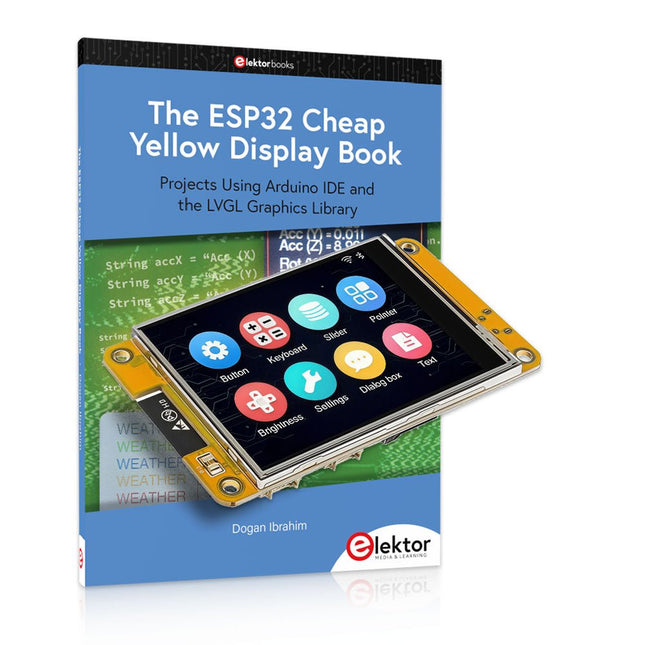
Plus de 40 projets ESP32 entièrement testés utilisant l'IDE Arduino et la bibliothèque graphique LVGL
Cette offre groupée comprend l'ESP32 Cheap Yellow Display (CYD), une carte de développement compacte combinant un microcontrôleur ESP32 standard et un écran couleur TFT de 320 x 240 pixels. La carte dispose également de plusieurs connecteurs pour les GPIO, la communication série (TX/RX), l'alimentation et la masse. L'écran intégré est un atout majeur : il permet aux utilisateurs de créer des projets graphiques complexes sans écran LCD ni écran externe.
Le livre d'accompagnement présente en détail le matériel et les connecteurs intégrés de la carte CYD. Il propose une gamme de projets de niveau débutant à intermédiaire, développés avec l'IDE Arduino 2.0. Les fonctions graphiques de base et la puissante bibliothèque graphique LVGL sont abordées, avec des projets pratiques illustrant chaque approche.
Tous les projets inclus ont été entièrement testés et sont prêts à l'emploi. Le livre fournit des schémas fonctionnels, des schémas de circuits, des listes de codes complètes et des explications étape par étape. Avec la bibliothèque LVGL, les lecteurs peuvent créer des interfaces graphiques modernes et en couleur à l'aide de widgets tels que des boutons, des étiquettes, des curseurs, des calendriers, des claviers, des graphiques, des tableaux, des menus, des animations, etc.
ESP32 Cheap Yellow Display Board
Cette carte de développement (également connue sous le nom de « Cheap Yellow Display ») est alimentée par l'ESP-WROOM-32, un MCU double cœur avec des capacités Wi-Fi et Bluetooth intégrées. Il fonctionne à une fréquence principale allant jusqu'à 240 MHz, avec 520 Ko de SRAM, 448 Ko de ROM et une mémoire Flash de 4 Mo. La carte dispose d'un écran de 2,8 pouces avec une résolution de 240 x 320 et un toucher résistif.
De plus, la carte comprend un circuit de contrôle du rétroéclairage, un circuit de contrôle tactile, un circuit de commande de haut-parleur, un circuit photosensible et un circuit de contrôle LED RVB. Il fournit également un emplacement pour carte TF, une interface série, une interface de capteur de température et d'humidité DHT11 et des ports IO supplémentaires.
Le module prend en charge le développement dans Arduino IDE, ESP-IDE, MicroPython et Mixly.
Applications
Transmission d'images pour les appareils Smart Home
Surveillance sans fil
Agriculture intelligente
Reconnaissance sans fil QR
Signal du système de positionnement sans fil
Et d'autres applications IoT
Spécifications
Microcontrôleur
ESP-WROOM-32 (MCU double cœur avec Wi-Fi et Bluetooth intégrés)
Fréquence
Jusqu'à 240 MHz (la puissance de calcul peut atteindre 600 DMIPS)
SRAM
520 Ko
ROM
448 Ko
Flash
4 Mo
Tension de fonctionnement
5 V
Consommation électrique
env. 115 mA
Écran
Écran TFT couleur de 2,8 pouces (240 x 320)
Toucher
Toucher résistif
Puce du pilote
ILI9341
Dimensions
50 x 86 mm
Poids
50 g
Téléchargements
GitHub
Cette offre groupée contient :
The ESP32 Cheap Yellow Display Book (prix normal : 35 €)
ESP32 Cheap Yellow Display Board (prix normal : 25 €)
1x Carte de développement ESP32 avec écran de 2,8 pouces et boîtier en acrylique
1x Stylet tactile
1x Câble de connexion
1x Câble USB
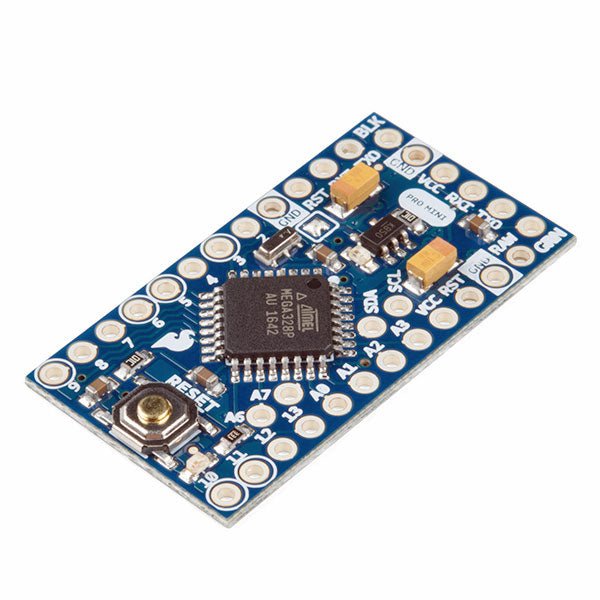
L'Arduino Pro Mini est une carte à microcontrôleur basée sur l' ATmega328P.
Elle dispose de 14 broches d'entrée/sortie numériques (dont 6 peuvent être utilisées comme sorties PWM), de 6 entrées analogiques, d'un résonateur embarqué, d'un bouton de réinitialisation et de trous pour monter des connecteurs. Un connecteur à six broches peut être connectée à un câble FTDI ou à une carte breakout de Sparkfun pour fournir une alimentation et une communication USB à la carte.
L'Arduino Pro Mini est destiné à des montages semi-permanents sur des dispositifs ou dans des expositions. La carte est livrée sans connecteurs, ce qui permet d'utiliser différents types de connecteurs ou de souder directement les fils. La disposition des broches est compatible avec celle de l'Arduino Mini.
Spécifications
Microcontrôleur
ATmega328P
Alimentation de la carte
5-12 V
Tension de fonctionnement du circuit
5 V
Broches E/S numériques
14
Broches PWM
6
UART
1
SPI
1
I²C
1
Broches d'entrée analogiques
6
Interruptions externes
2
Courant continu par broche d'E/S
40 mA
Mémoire flash
32 Ko dont 2 Ko utilisés par le bootloader
SRAM
2 Ko
EEPROM
1 KB
Fréquence d'horloge
16 MHz
Dimensions
18 x 33,3 mm
Téléchargements
Fichiers Eagle
Schémas
La carte d'apprentissage Elektor Arduino Nano MCCAB contient tous les composants (avec Arduino Nano) nécessaires aux exercices, tels que des diodes électroluminescentes, des interrupteurs, des boutons-poussoirs, des émetteurs de signaux acoustiques, etc. Ce système de formation à microcontrôleur permet également d'interroger ou de commander des capteurs, des moteurs ou des assemblages externes.
Spécifications (Carte de formation Arduino Nano MCCAB)
Alimentation électrique
Via la connexion USB du PC connecté ou un bloc d'alimentation externe (non inclus)
Tension de fonctionnement
+5 Vcc
Tension d'entrée
Toutes les entrées
0 V to +5 V
VX1 and VX2
+8 V to +12 V (uniquement en cas d'utilisation d'une alimentation externe)
Périphérie du matériel
LCD
2x16 caractères
Potentiomètre P1 & P2
JP3 : sélection de la tension de fonctionnement de P1 et P2
Distributeur
SV4 : Distributeur pour les tensions de fonctionnementSV5, SV6 : Distributeur pour les entrées/sorties du microcontrôleur
Interrupteurs et boutons
Bouton RESET sur le module Arduino Nano 6x interrupteurs à bouton poussoir K1 ... K6 6x interrupteurs à glissière S1 ... S6 JP2 : Connexion des interrupteurs avec les entrées du microcontrôleur
Buzzer
Buzzer piézo Buzzer1 avec cavalier sur JP6
Voyants lumineux
11 x LED : Indicateur d'état des entrées/sorties LED L sur le module Arduino Nano, connectée au GPIO D13 JP6 : Connexion des LED LD10 ... LD20 avec les GPIO D2 ... D12
Interfaces sérieSPI ET I²C
JP4 : Sélection du signal à la broche X du connecteur SPI SV12 SV9 à SV12 : interface SPI (3,3 V/5 V) ou interface I²C
Sortie de commutation pour les appareils externes
SV1, SV7 : sortie de commutation (maximum +24 V/160 mA, alimentation externe) SV2 : 2x13 connecteurs pour la connexion de modules externes
Matrice de 3x3 LED(9 LED rouges)
SV3 : Colonnes de la matrice LED 3x3 (sorties D6 ... D8) JP1 : Connexion des lignes avec les GPIOs D3 ... D5
Logiciel
Bibliothèque MCCABLib
Contrôle des composants matériels (interrupteurs, boutons, DEL, matrice de DEL 3x3, buzzer) sur la carte de formation MCCAB.
Température de fonctionnement
Jusqu'à +40 °C
Dimensions
100 x 100 x 20 mm
Spécifications (Arduino Nano)
Microcontrôleur
ATmega328P
Architecture
AVR
Tension de fonctionnement
5 V
Mémoire flash
32 Ko, dont 2 Ko utilisés par le chargeur de démarrage
SRAM
2 KB
Vitesse d'horloge
16 MHz
Connecteurs d'entrée analogique
8
EEPROM
1 KB
Courant continu par connecteur d'E/S
40 mA sur un connecteur d'E/S, maximum total de 200 mA sur l'ensemble des connecteurs
Tension d'entrée
7-12 V
Connecteurs E/S numériques
22 (dont 6 PWM)
Sortie PWMt
6
Consommation électrique
19 mA
Dimensions
18 x 45 mm
Poids
7 g
Inclus
1x Elektor Arduino Nano Training Board MCCAB
1x Arduino Nano
Mit dem Elektor Arduino Nano Trainingsboard (MCCAB) eigene Projekte realisieren
Der Mikrocontroller ist das wohl faszinierendste Teilgebiet der Elektronik, denn aufgrund der Vielzahl von Funktionen, die er auf seinem Chip vereinigt, ist er für den Entwickler ein universelles Multi-Tool zur Realisierung seiner Projekte. Praktisch jedes Gerät des täglichen Gebrauchs wird heute von einem Mikrocontroller gesteuert. Für einen elektronischen Laien blieb es aufgrund der Komplexität bisher allerdings ein Wunschtraum, eigene Ideen mit einem Mikrocontroller zu realisieren. Das Arduino-Konzept hat den Einsatz von Mikrocontrollern weitgehend vereinfacht, sodass jetzt auch Laien eigene Elektronik-Ideen mit einem Mikrocontroller verwirklichen können.
Buch & Hardware im Bundle: 'Learning by Doing'
Dieses im Bundle mitgelieferte Buch (im großen A4-Format) zeigt, wie man auch ohne große Erfahrung in Elektronik und Programmiersprachen eigene Projekte mit einem Mikrocontroller realisieren kann. Es ist ein Mikrocontroller-Praxiskurs für Einsteiger, denn nach einem Überblick über die Interna des Mikrocontrollers und einer Einführung in die Programmiersprache C liegt der Schwerpunkt des Kurses auf den praktischen Übungen. Der Leser eignet sich die erforderlichen Kenntnisse durch 'Learning by Doing' an: in dem umfangreichen Praxisteil mit 12 Projekten und 46 Übungen wird das im vorderen Teil des Buches Gelernte mit vielen Beispielen unterlegt. Die Übungen sind dabei so aufgebaut, dass der Bearbeiter eine Aufgabenstellung erhält, die er mit seinem im Theorieteil des Buches aufgebauten Wissen löst. Für jede Übung gibt es anschließend eine ausführlich erklärte und kommentierte Musterlösung, die dem Bearbeiter bei Problemen weiterhilft und die er mit seiner eigenen Lösung vergleichen kann.
Arduino IDE
In der Arduino IDE, einer Software-Entwicklungsumgebung, die kostenlos auf den eigenen PC heruntergeladen werden kann und die das gesamte Softwarepaket enthält, das für ein eigenes Mikrocontroller-Projekt benötigt wird, schreibt der Bearbeiter mit dem Editor der IDE seine Programme („Apps“) in der Programmiersprache C. Der in die Arduino IDE integrierte Compiler übersetzt sie in die Bits und Bytes, die der Mikrocontroller versteht und die dann über ein USB-Kabel in den Speicher des Mikrocontrollers auf dem Elektor Arduino Nano Trainingsboard (MCCAB) geladen werden.
Externe Sensoren, Motoren oder Baugruppen abfragen oder steuern
Das Elektor Arduino Nano Trainingsboard (MCCAB) enthält neben einem Mikrocontrollermodul Arduino Nano alle für die Übungen benötigten Bauteile wie Leuchtdioden, Schalter, Taster, akustische Signalgeber usw. Auch externe Sensoren, Motoren oder Baugruppen können mit diesem Mikrocontroller-Übungssystem abgefragt oder gesteuert werden.
Technische Daten (Arduino Nano Trainingsboard MCCAB)
Stromversorgung
Über die USB-Verbindung des zur Erstellung der Programme sowieso angeschlossenen PCs oder ein externes Netzteil (nicht im Lieferumfang enthalten)
Betriebsspannung
+5 Vcc
Eingangsspannung
Alle Eingänge
0 V bis +5 V
VX1 und VX2
+8 V bis +12 V (nur bei Verwendung eines externen Netzteils)
Mikrocontrollermodul
Arduino Nano
Hardwareperipherie
LCD
2x16 Zeichen
Potenziometer P1 & P2
JP3: Auswahl der Betriebsspannung von P1 & P2
Verteiler
SV4: Verteiler für die BetriebsspannungenSV5, SV6: Verteiler für die Ein-/Ausgänge des Mikrocontrollers
Schalter und Taster
RESET-Taster auf dem Arduino Nano-Modul6x Tastschalter K1 … K66x Schiebeschalter S1 … S6JP2: Verbindung der Schalter mit den Eingängen des Mikrocontrollers
Summer
Piezo-Summer Buzzer1 mit Steckbrücke auf JP6
Leuchtanzeigen
LED L auf dem Arduino Nano-Modul, verbunden mit GPIO D1311x LED: Zustandsanzeige für die Ein-/AusgängeJP6: Verbindung der LEDs LD10 … LD20 mit den GPIOs D2 … D12
Serielle SchnittstellenSPI & I²C
JP4: Auswahl des Signals an Pin X der SPI-Steckerleiste SV12SV9 bis SV12: SPI-Interface (3,3 V/5 V) bzw. I²C-Interface
Schaltausgang für externe Geräte
SV1, SV7: Schaltausgang (maximal +24 V/160 mA, extern zugeführt)SV2: 2x13 Pins zum Anschluss externer Module
3x3 LED-Matrix (9 rote LEDs)
SV3: Spalten der 3x3 LED-Matrix (Ausgänge D6 … D8)JP1: Verbindung der Reihen mit den GPIOs D3 … D5
Software
Library MCCABLib
Steuerung der Hardware-Komponenten (Schalter, Taster, Leuchtdioden, 3x3 LED-Matrix, Summer) auf dem MCCAB Trainingsboard
Betriebstemperatur
bis +40 °C
Abmessungen
100 x 100 x 20 mm
Technische Daten (Arduino Nano)
Mikrocontroller
ATmega328P
Architektur
AVR
Betriebsspannung
5 V
Flashspeicher
32 KB, davon 2 KB vom Bootloader belegt
SRAM
2 KB
Taktfrequenz
16 MHz
Analoge IN-Pins
8
EEPROM
1 KB
DC-Strom pro I/O-Pin
40 mA an einem I/O-Pin, insgesamt maximal 200 mA an allen Pins gemeinsam
Eingangsspannung
7-12 V
Digitale I/O-Pins
22 (6 davon sind PWM-fähig)
PWM-Ausgänge
6
Stromverbrauch
19 mA
Abmessungen
18 x 45 mm
Gewicht
7 g
Lieferumfang
Elektor Arduino Nano MCCAB Trainingsboard
Arduino Nano
Buch: Mikrocontroller-Praxiskurs für Arduino-Einsteiger
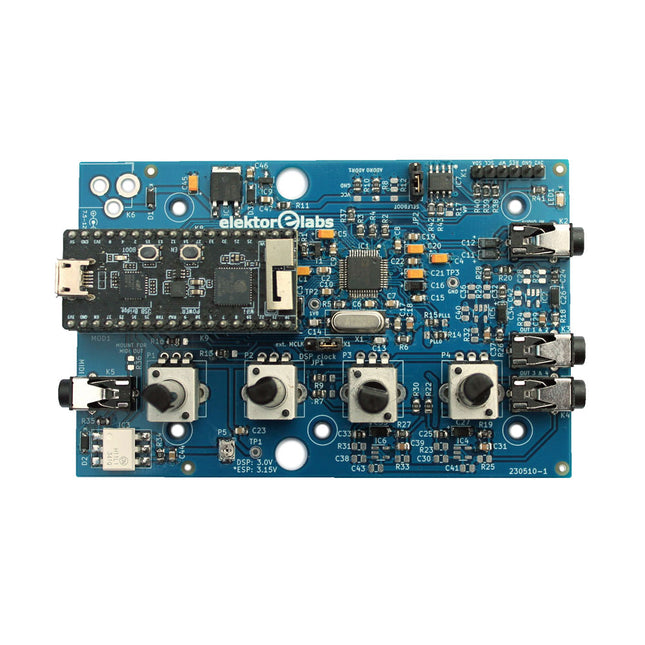
Le Elektor Audio DSP FX Processor combine un microcontrôleur ESP32 et un DSP Audio ADAU1701 d'Analog Devices. Outre un noyau DSP programmable par l'utilisateur, l'ADAU1701 intègre des convertisseurs analogique-numérique et numérique-analogique de haute qualité et dispose d'un port I²S. Cela le rend approprié comme interface audio de haute qualité pour l'ESP32.
Les programmes pour l'ESP32 peuvent être créés avec Arduino, Platform IO, CMake ou en utilisant Espressif IDF d'une autre manière. Les programmes pour les DSP audio ADAU7101 sont créés avec l'outil de programmation visuelle gratuit SigmaStudio en glissant et déposant des blocs d'algorithmes prédéfinis sur un canevas.
Applications
Sink audio Bluetooth/Wi-Fi (par ex. haut-parleur) et source
Pédale d'effet guitare (stomp box)
Synthétiseur musical
Générateur de sons/fonctions
Filtre cross-over programmable pour haut-parleurs
Processeur d'effets audio avancé (réverbération, chorus, pitch shifting, etc.)
Appareil audio connecté à Internet
Plate-forme d'expérimentation DSP
MIDI sans fil
Convertisseur MIDI vers CV
et bien d'autres...
Spécifications
Processeur audio numérique ADAU1701 28/56 bits, 50 MIPS prenant en charge des taux d'échantillonnage allant jusqu'à 192 kHz
Microcontrôleur double cœur ESP32 32 bits avec Wi-Fi 802.11b/g/n et Bluetooth 4.2 BR/EDR et BLE
2 entrées audio 24 bits (2 V RMS, 20 kΩ)
4 sorties audio 24 bits (0,9 V RMS, 600 Ω)
4x potentiomètres de contrôle
Entrée et sortie MIDI
Port d'extension I²C
Fonctionnement multimode
Alimentation : USB 5 V CC ou 7,5-12 V CC (prise cylindrique, broche centrale GND)
Consommation de courant (moyenne) : 200 mA
Inclus
1x Carte Audio DSP FX Processor (assemblée)
1x ESP32-PICO-KIT
2x Cavaliers
2x Connecteurs à 18 broches (female)
4x Potentiomètres de 10 Ko
Téléchargements
Documentation
GitHub
,
par Lobna Belarbi
Cartes, kits et outils indispensables pour commencer votre parcours Arduino avec Elektor
Que vous soyez un débutant désireux d'explorer l’univers des microcontrôleurs ou un maker expérimenté souhaitant étoffer sa panoplie d’outils, Elektor propose une sélection soignée de...