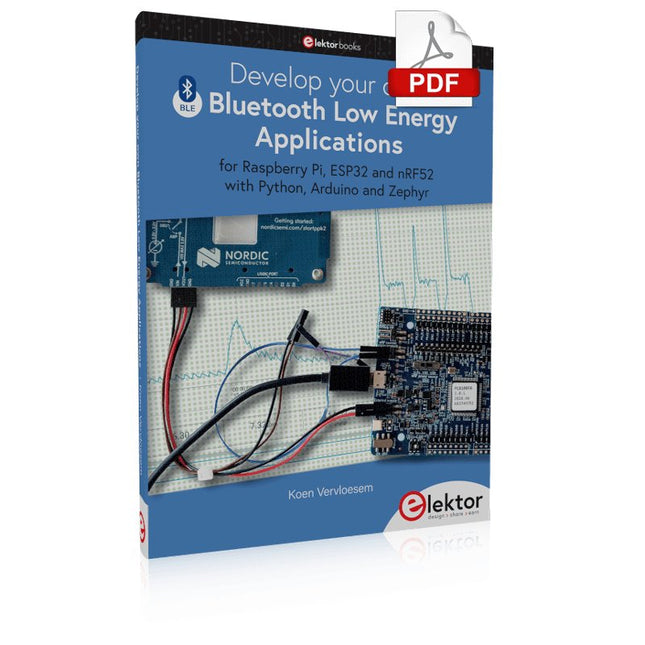
For Raspberry Pi, ESP32 and nRF52 with Python, Arduino and Zephyr
Bluetooth Low Energy (BLE) radio chips are ubiquitous from Raspberry Pi to light bulbs. BLE is an elaborate technology with a comprehensive specification, but the basics are quite accessible.
A progressive and systematic approach will lead you far in mastering this wireless communication technique, which is essential for working in low power scenarios.
In this book, you’ll learn how to:
Discover BLE devices in the neighborhood by listening to their advertisements.
Create your own BLE devices advertising data.
Connect to BLE devices such as heart rate monitors and proximity reporters.
Create secure connections to BLE devices with encryption and authentication.
Understand BLE service and profile specifications and implement them.
Reverse engineer a BLE device with a proprietary implementation and control it with your own software.
Make your BLE devices use as little power as possible.
This book shows you the ropes of BLE programming with Python and the Bleak library on a Raspberry Pi or PC, with C++ and NimBLE-Arduino on Espressif’s ESP32 development boards, and with C on one of the development boards supported by the Zephyr real-time operating system, such as Nordic Semiconductor's nRF52 boards.
Starting with a very little amount of theory, you’ll develop code right from the beginning. After you’ve completed this book, you’ll know enough to create your own BLE applications.
Le kit X500 V2 ARF est un kit de drone professionnel en fibre de carbone abordable, léger et robuste, facile à assembler (moins de 15 minutes). Il est livré avec le kit de cadre X500 V2 et les moteurs, ESC, tableaux de distribution d'énergie et hélices préinstallés. Il est parfaitement compatible avec divers contrôleurs de vol tels que la série Holybro Pixhawk, Durandal, Pix32 V5, etc. Il existe de nombreuses améliorations par rapport au modèle précédent.
Spécifications
Empattement : 500 mm
Modèle de montage moteur : 16x16 mm
Corps du cadre : 144x144 mm, 2 mm d'épaisseur
Hauteur du train d'atterrissage : 215 mm
Espace entre les plaques supérieure et inférieure : 28 mm
Poids : 610g
Temps de vol : environ 18 minutes de vol stationnaire sans charge utile supplémentaire. Testé avec une batterie de 5000 mAh.
Charge utile : 1 500 g (sans batterie)
Recommandation de batterie : 4S 3000-5000 mAh 20C+ avec batterie Lipo XT60 (non incluse)
Inclus
Kit cadre X500 V2
Avec les éléments préinstallés :
4x moteurs : moteur Holybro 2216 KV920 (4 pièces) avec prise XT30
4x ESC (BLHeli S ESC 20A)
6x 1045 hélices
Carte de distribution d'énergie – Prise XT60 pour batterie et prise XT30 pour ESC et périphériques
Remarque : le support de caméra de profondeur est vendu séparément.
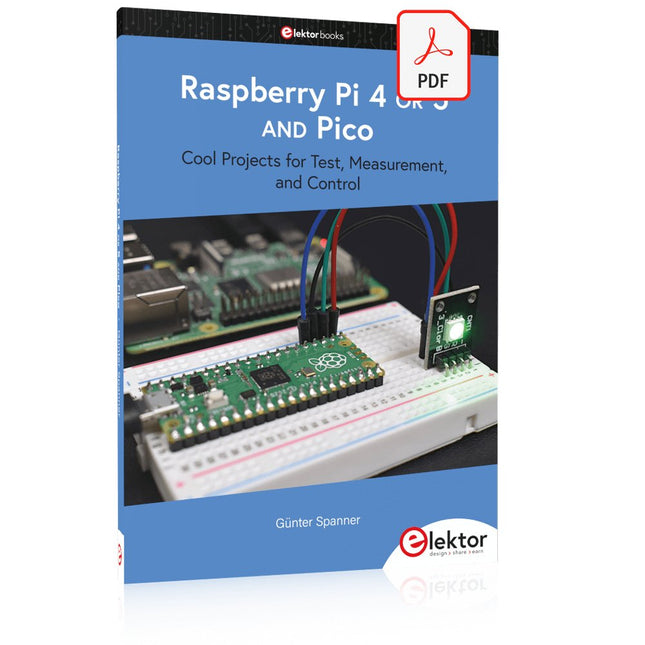
Cool Projects for Test, Measurement, and Control
The Raspberry Pi has dominated the maker scene for many years. Freely accessible I/O pins have made it one of the most popular processor boards of all time. However, the classic Raspberry Pi has no analog inputs. Direct measurement of analog values is therefore not possible. Consequently, photodiodes, NTCs, Hall sensors, etc. cannot be read directly. In addition, the pins are connected directly to the exposed contacts, i.e. without a driver or protection circuit. This can quickly destroy the central controller and thus the entire Raspberry Pi.
These problems can be elegantly solved with the Pico. As a front-end, it can easily handle a wide range of measurement tasks. In addition, the Pico is much cheaper than a classic Raspberry Pi 4 or 5. If a faulty circuit leads to the destruction of the Pico, this is relatively easy to handle. This makes the combination of a classic Raspberry Pi 4 or 5 and the Pico an ideal pair.
The book introduces the broad and highly topical field of modern controller technology using the combined force of a Raspberry Pi 4 or 5 and a Raspberry Pi Pico. In addition to a detailed introduction to the operation and functionality of the controller boards themselves, the book also focuses on data acquisition and processing with digital processors. Especially the combination of both systems offers a wide range of interesting possibilities.
Some practical projects from the contents:
USB between Raspberry Pi 4 or 5 and Pico
I²C Communication and Pico as an I²C device
Voltmeter and Computer Thermometer
Pico W as a Web Server and WLAN Scanner
Frequency Meters and Generators
OLED Displays on Raspberry Pi 4 or 5 and Pico
Energy Saving Monitor
Which Astronauts are in Orbit?
Mini Monitor for Current Bitcoin Exchange Rate
Accroche-regard basé sur Raspberry Pi
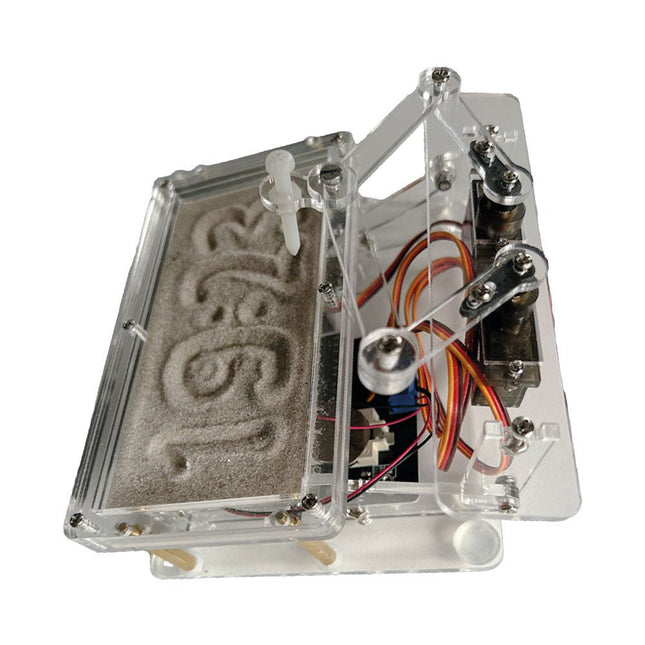
Une horloge à sable standard ne fait qu'indiquer le temps qui passe. En revanche, cette horloge à sable contrôlée par le Raspberry Pi Pico indique l'heure exacte en 'gravant' les quatre chiffres de l'heure et des minutes dans la couche de sable. Après un temps réglable, le sable est aplati par deux moteurs vibrants et tout recommence.
Au cœur de l'horloge de sable se trouvent deux servomoteurs qui entraînent un stylo dans un mécanisme de pantographe. Un troisième servomoteur soulève le stylo de haut en bas. Le bac à sable est équipé de deux moteurs vibrants qui aplatissent le sable. La partie électronique de l'horloge des sables se compose d'un Raspberry Pi Pico et d'une carte RTC/driver avec une horloge en temps réel, ainsi que des circuits de commande pour les servomoteurs.
Un manuel de construction détaillé peut être téléchargé.
Caractéristiques
Dimensions: 135 x 110 x 80 mm
Temps de construction : environ. 1,5 à 2 heures
Inclus
3x Feuilles acryliques prédécoupées avec toutes les pièces mécaniques
3x Mini servomoteurs
2x moteurs de vibration
1x Raspberry Pi Pico
1x Carte RTC/pilote avec les pièces assemblées
Ecrous, boulons, entretoises et fils pour l'assemblage
Sable blanc à grains fins
Der ideale Start für alle, die in die Welt der Elektronik und Mikrocontroller eintauchen möchten!
Dieses Sonderheft vermittelt auf verständliche und praxisnahe Weise die Grundlagen der Elektronik – kombiniert mit spannenden Projekten rund um den beliebten Arduino.
Statt trockener Theorie bietet dieses Heft viele leicht nachvollziehbare Experimente, die auf einem Steckboard und mit einem Arduino Uno umgesetzt werden können. So lernen Sie Schritt für Schritt, wie elektronische Bauteile funktionieren und wie Sie sie gezielt einsetzen, um eigene Projekte zu entwickeln.
Enthaltene Projekte
Strom & Spannung: Wie alles begann
Arduino-Hardware
Arduino-Programmierung
Der Stromkreis
Mit dem Multimeter messen
Schaltpläne und Experimentier boards
Schaltpläne erstellen
Breadboard ansichten mit Fritzing
Schaltungen online simulieren
Unverzichtbar: Widerstände (Teil 1)
Praxis mit Widerständen (Teil 2)
Veränderliche Widerstände
Dioden: Einbahnstraße für den Strom
Der Transistor-Schalter
Elektromagnetismus
Relais und Motoren
OpAmps: Operationsverstärker
Kondensatoren
Timer NE555
PWM und analoge Werte mit Arduino
7-Segment Temperatur anzeige
Einführung ins Löten und LCDs
Pfiffige Projekte zum Messen, Steuern und Regeln
Der Raspberry Pi dominiert seit vielen Jahren die Maker-Szene. Frei verfügbare I/O-Pins machten ihn zu einem der beliebtesten Prozessorboards aller Zeiten. Allerdings verfügt der klassische Raspberry Pi über keinerlei Analogeingänge. Eine direkte Messung analoger Werte ist damit nicht möglich. So können weder Photodioden noch NTCs oder Hallsensoren etc. unmittelbar ausgelesen werden. Zudem sind die Pins direkt, d. h. ohne Treiber oder Schutzschaltung, mit den freiliegenden Kontakten verbunden. Dadurch kann der zentrale Controller und damit der gesamte Raspberry Pi schnell zerstört werden.
Mit dem Pico können diese Probleme elegant gelöst werden. Er kann als sogenanntes „Frontend“ problemlos vielfältige Messaufgaben übernehmen. Zudem ist der Pico deutlich preisgünstiger als ein klassischer Raspberry Pi 4. Falls eine Fehlbeschaltung zur Zerstörung des Pico führt, ist dies vor allem für nicht-professionelle Anwender relativ leicht zu verkraften. Der klassische Raspberry Pi und der Pico werden so zum idealen Duo.
Das Buch führt entsprechend in das weite und hochaktuelle Gebiet der modernen Controllertechnik anhand der beiden Boards „Raspberry Pi 4“ und „Raspberry Pi Pico“ ein. Neben einer tiefergehenden Einführung in die Arbeits- und Funktionsweise der Controllerboards selbst wird insbesondere auch auf die Messwerterfassung und -verarbeitung mit digitalen Prozessoren eingegangen. Insbesondere die Kombination beider Systeme bietet vielfältige und hochinteressante Möglichkeiten.
Praktische Projekte aus dem Inhalt:
USB-Verbindung zwischen Raspberry Pi 4 und Pico
I²C-Kommunikation und Pico als I²C-Device
Voltmeter und Computerthermometer
Pico W als Web-Server und WLAN-Scanner
Frequenzmesser und -generatoren
OLED-Displays an Pico und Raspberry Pi 4
Energiesparmonitor
Welche Astronauten sind im Orbit?
Mini-Monitor für den aktuellen Bitcoin-Kurs
De mens is van nature uitgerust met sensoren voor geluid, licht, geur, smaak en gevoel. Zintuigen die met elektronica slechts ten dele gekopieerd kunnen worden. Met de Elektor sensorkit kunnen we wel aardig in de buurt komen.
Sensoren kunnen elektronica aansturen, maar ze kunnen ons ook van informatie voorzien. Daarom vormt niet alleen het meten van grootheden, maar ook het zichtbaar maken ervan via de Arduino seriële monitor een niet onbelangrijk deel van dit boek.
De microprocessor ATtiny85 die de Arduino-taal begrijpt, maakt het experimenteren met sensoren gemakkelijk en goedkoop. We zullen niet snel een Arduino-kaartje vast solderen in een permanente opstelling. Bij een achtpotige ATtiny zal dat geen schuldgevoel opleveren. Dat neemt niet weg dat alle sketches gewoon op elk Arduino-board draaien met mogelijk hier en daar een aanpassing van pennummers omdat die kunnen verschillen met reguliere Arduino-boards.
We zullen uitgebreid aandacht besteden aan het programmeren van de ATtiny. Veel schakelingen zijn bruikbaar in het natuurkundepracticum op school of voor bedrijfsmatige toepassingen. Maar de nadruk ligt toch wel op de (beginnende) elektronicahobbyist die zijn vrije tijd op een leuke maar vooral ook nuttige manier wil besteden. Want meer dan ooit tevoren heeft techniek de toekomst.
Elektor GREEN en GOLD leden kunnen deze uitgave hier downloaden.
Nog geen lid? Klik hier om een lidmaatschap af te sluiten.
Audio DSP FX Processor Boarddeel 1: eigenschappen en ontwerp
50 jaar Elektor in het Engels
KiCad 8belangrijkste nieuwe en vernieuwde functies
Elektor @ elektronica 2024electronica Fast Forward 2024, Experts on Stage, Influencer Forums, Live Elektor Lab Talk Shows en meer
Elektor MultiCalculator KitArduino-gebaseerde DHZ-calculator voor elektronici
Goedkope GNSS RTK-systemenmet centimeter-nauwkeurigheid
Printlayout en veiligheidtips voor een veilig en duurzaam ontwerp van uw printen
Opamp-testervoor audio en andere toepassingen
Project-update #4: ESP32-gebaseerde energiemeterenergiemonitoring met MQTT
Real-time spectrumanalyzer met golfgeleider-technologie en multi-interface PC’sAaronia introduceert nieuw productsegment en presenteert eerste prototypes op electronica in München
SMT-spoelenspoelen en ferrieten – selectie gemakkelijk gemaakt
EMC-conformiteit bereiken met EMI-afscherming
De perfecte tool voor elke elektronicaliefhebbereindeloze mogelijkheden met Red Pitaya en 1.000+ Click Boards™
HDI in het middeneen nieuwe kosteneffectieve PCB-poolingservice voor kleine BGA’s
Uitdagingen van DFM-analyse voor flex- en rigid-flex-ontwerpen
Open source-toolsantennesimulator, componentenbeheer, rekenmachine en meer
Elektor infographicprototyping en productie
Uit het leven gegrepenmicrotechnofobie
3D-kerstboomdriedimensionale print met een goedkope 32 bit-microcontroller
Alle begin......houdt nog lang niet op(amp)!
Autonome sensor-node (project-update #1)RTC en voedingsschakelaar
2024: een AI-odysseeeen terugblik op de toekomst
LED-displays met de MAX7219aan de slag met een grandioze chip
Project 2.0correcties, updates en brieven van lezers
Vibrotactiele handschoenendoorbraak voor Parkinson-patiënten
Mastering the I²C Bus takes you on an exploratory journey of the I²C Bus and its applications. Besides the Bus protocol, plenty of attention is given to the practical applications and designing a stable system. The most common I²C compatible chip classes are covered in detail.
Two experimentation boards are available that allow for rapid prototype development. These boards are completed by a USB to I²C probe and a software framework to control I²C devices from your computer. All samples programs can be downloaded from the 'Attachments/Downloads' section on this page.
Projects built on Board 1:
USB to I²C Interface, PCA 9534 Protected Input, PCA 9534 Protected Output, PCA 9553 PWM LED Controller, 24xxx EEPROM Module, LM75 Temperature Sensor, PCA8563 Real-time Clock with Battery Backup, LCD and Keyboard Module, Bus Power Supply.
Projects built on Board 2:
Protected Input, Protected Output, LM75 Temperature Sensor, PCF8574 I/O Board, SAA1064 LED Display, PCA9544 Bus Expander, MCP40D17 Potentiometer, PCF8591 AD/DA, ADC121 A/D Converter, MCP4725 D/A Converter, 24xxx EEPROM Module.
This book is about the Raspberry Pi 3 computer and its use in various control and monitoring applications. The book explains in simple terms and with tested and working example projects, how to configure the Raspberry Pi 3 computer, how to install and use the Linux operating system, and how to write hardware based applications programs using the Python programming language.
The nice feature of this book is that it covers many Raspberry Pi 3 based hardware projects using the latest hardware modules such as the Sense HAT, Swiss Pi, MotoPi, Camera module, and many other state of the art analog and digital sensors. An important feature of the Raspberry Pi 3 is that it contains on-board Bluetooth and Wi-Fi modules. Example projects are given in the book on using the Wi-Fi and the Bluetooth modules to show how real-data can be sent to the Cloud using the Wi-Fi module, and also how to communicate with an Android based mobile phone using the Bluetooth module.
The book is ideal for self-study, and is intended for electronic/electrical engineering students, practising engineers, research students, and for hobbyists. It is recommended that the book should be followed in the given Chapter order.
Over 30 projects are given in the book. All the projects in the book are based on the Python programming language and they have been fully tested. Full program listings of every project are given in the book with comments and full descriptions. Experienced programmers should find it easy to modify and update the programs to suit their needs.
The following sub-headings are given for each project to make it as easy as possible for the readers to follow the projects:
Project title
Description
Aim of the project
Raspberry Pi type
Block diagram
Circuit diagram
Program listing
Elektor GREEN and GOLD members can download their digital edition here.
Not a member yet? Click here.
The RISC-V Open-Source Processor Architecture16 Boards and MCUs You Should Know
An FPGA-Based Audio Player with Equalizer (1)Mixing Digital Audio with an Arduino MKR Vidor 4000
Laser Head for Pico-Based Sand ClockDrawing with Light
Enter the STM32 Edge AI Contest
A Multi-Sensor Environmental Monitoring System for PlantsWireless Measurement of Water Supply and Light Conditions
Maixduino AI-Powered Automatic DoormanFace Detection with a Camera
Embedded Electronics 2024AI Is Set to Redefine the Industry
Charge-Based In-Memory Compute at EnCharge AI
AI Inferencing at 10 Times Lower Power and 20 Fold Lower Cost
Click Board Helps Develop and Train ML Models for Vibration Analysis
The Elektor Mini-WheelieA Self-Balancing Robot Kit
MCU, I See YouMCUViewer Open-Source Multiplatform Debugging Tool
USB 2.0 IsolatorElectrically Isolated Connections for USB Devices
Intervention Before DamagePredictive Maintenance in Practice
SPoE – Electromagnetic CompatibilitySingle-Pair with Power-Over-Ethernet Through the Eyes of EMC
Color TV: A Wonder of Its TimeCreating a New World
ECG Graph MonitoringAn Implementation with Hexabitz Modules and an STM32CubeMonitor
The Battle for AI at the Edge
HaLow Hits Record 16-km Wi-Fi Distance at 900 MHz
First CHERI RISC-V Embedded Chip and Early Access Programme
Third-Generation Wildfire Detection Uses Satellite Links
From Life’s ExperienceChoice Overload
Starting Out in Electronics……Continues Filtering and Controls Tone
Quasi-Analog ClockworkA Remake of an Elektor Classic
A Modular Approach to Sensor TestingThe ESP32-S3-Based Sensor Evaluation Board
2025: An AI OdysseyThe Rise of Foundation Models and Their Role in Democratizing AI
Raspberry Pi Standalone MIDI Synthesizer (1)Preparing a Platform for Some Edge AI Experiments
Err-lectronicsCorrections, Updates, and Readers’ Letters
Universal AI RISC-V Processor Does It All — CPU, GPU, DSP, FPGA
CEO Interview: Ventiva’s Thin and Cool Tech
Dual-Core Programming with a Raspberry Pi PicoVenture Into the World of Parallel Programming
Les membres d'Elektor GREEN et GOLD peuvent télécharger ce numéro ici .
Pas encore membre? Cliquez ici pour souscrire une adhésion.
L’innovation IoT au galop
Un cadre photo couleur E-Ink WiFi
Tutoriel ESP Launchpad de zéro à flasher en quelques minutes
ESP32 et ChatGPT en route vers un système d’auto-programmation…
Talkie-walkie avec ESP-NOW pas tout à fait WiFi, pas tout à fait Bluetooth, mais...
De l'idée au circuit avec l'ESP32-S3 voici comment construire un prototype avec les puces Espressif
Innovation en matière de puce AIoT une interview avec Teo Swee-Ann, PDG d'Espressif
Simulez ESP32 avec Wokwi le jumeau numérique de votre projet
Test de l'ESP32-S3-BOX-3 une plateforme complète de développement AIoT
pour votre poste de travail électronique Considérations et conseils des techniciens Espressif
L'histoire d'ESP RainMaker comment nous avons construit « votre » cloud IoT
Construction de l'Elektor Cloc 2.0 un produit Elektor déballé par Espressif
L'ESP32-P4 se déchaîne la prochaine ère des microcontrôleurs
Reste + intégré un puissant duo de développement
Qui sont les intrépides développeurs Rust embarqués ? c'est ainsi qu'Espressif cultive Rust embarqué pour l'ESP32
la série SoC d'Espressif
Un automate avec les solutions Espressif avec les possibilités et fonctionnalités du protocole ISOBUS
La carte VGA ESP32-S3 suivez Bitluni pendant le processus de conception
Prise d'empreintes acoustiques avec l'ESP32 reconnaissance de chansons avec le projet open-source Olaf
Sapin de Noël rond 2023 une façon high-tech de célébrer les vacances
Une vie plus simple et plus pratique un projet amateur basé sur le module ESP8266 d'Espressif
Créer des applications IoT sans expertise logicielle avec la plateforme Blynk IoT et le matériel Espressif
Créez une interface utilisateur intelligente sur ESP32
Développement IoT rapide et facile avec M5Stack
Prototype d'un compteur d'énergie basé sur ESP32
Un distributeur à valeur ajoutée pour l'IoT et plus encore
Dans les coulisses : entretien avec Arduino à propos du Nano ESP32 Alessandro Ranellucci et Martino Facchin sur la collaboration avec Espressif
les coulisses d'Espressif
Rationalisez le développement de MCU avec la séparation des privilèges ESP-IDF
Un serveur de reconnaissance vocale open source... ...et la BOÎTE ESP
L'œil pensant, la reconnaissance faciale et bien plus encore avec l'ESP32-S3-EYE
Interrupteur à pile bouton avec ESP32-C2 conception axée sur la performance
La matière fait avancer la maison intelligente libère le potentiel de l'IoT pour la maison intelligente
Tech the Future : où aller avec Smarthome IoT ?