
Résultats de la recherche pour "raspberry or pi or 3 or basic or to or advanced or projects"
-
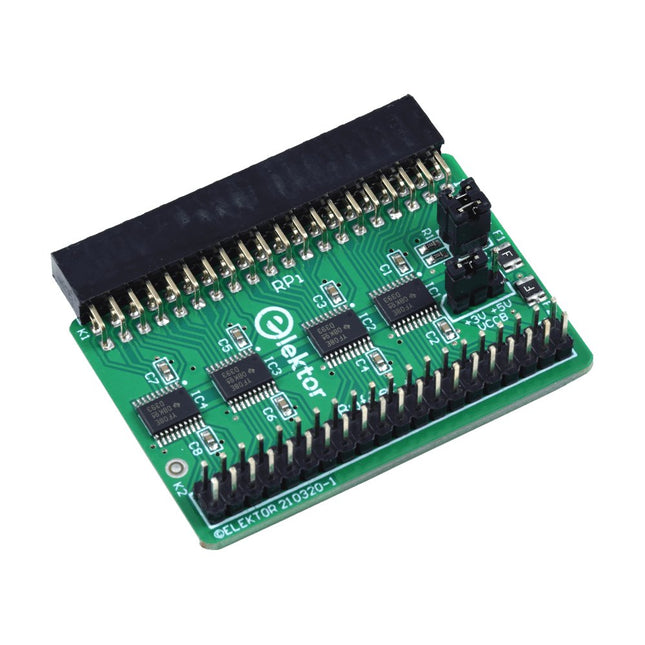
Elektor Labs Carte tampon pour Raspberry Pi d'Elektor
Lorsque vous expérimentez régulièrement avec le Raspberry Pi et que vous connectez une variété de matériel externe au port GPIO via le connecteur, il se peut que vous ayez causé des dommages par le passé. La carte tampon Raspberry Pi d'Elektor est là pour éviter cela ! La carte est compatible avec les Raspberry Pi Zero, Zero 2 (W), 3, 4, 5, 400 et 500. Les 26 GPIO sont protégées par des convertisseurs de tension bidirectionnels afin de protéger le Raspberry Pi lors de l'expérimentation de nouveaux circuits. Le circuit imprimé est destiné à être inséré à l'arrière du Raspberry Pi 400/500. Le connecteur à connecter au Raspberry Pi est un réceptacle 40 voies à angle droit (2x20). La platine est seulement un peu plus large. Un câble plat à 40 voies avec des connecteurs 2x20 appropriés peut être connecté au connecteur de sortie du tampon pour expérimenter avec par exemple un circuit sur une plaque d’expérimentation ou sur une platine. Le circuit utilise 4x circuits intégrés TXS0108E de Texas Instruments. Le circuit imprimé peut également être monté sur un Raspberry Pi. Téléchargements Schematics Layout
€ 34,95
Membres : € 31,46
-

Elektor Digital Internet of Things (DE) E-BOOK
Internet des objets (DE) | Livre électronique
€ 34,80
Membres : € 31,32
-
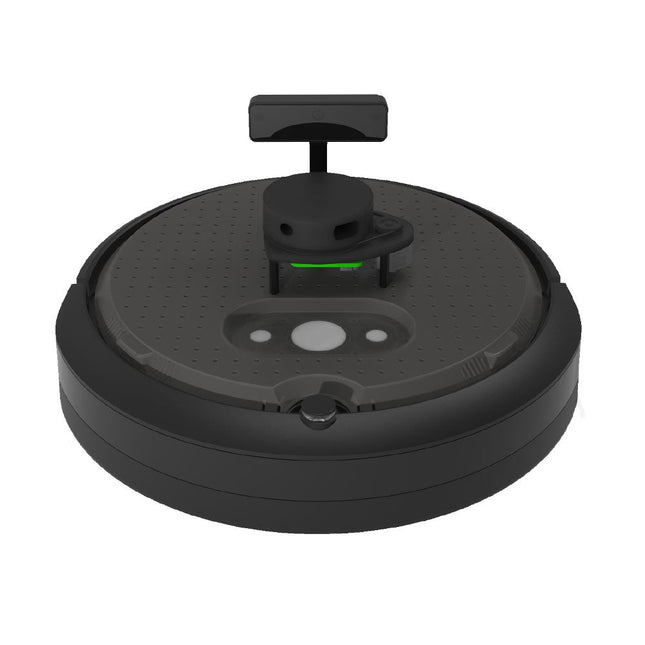
Clearpath Robotics Clearpath Robotics TurtleBot 4 Lite
TurtleBot 4 est la nouvelle génération de la plateforme robotique open source la plus populaire au monde pour l'éducation et la recherche, offrant une meilleure puissance de calcul, de meilleurs capteurs et une expérience utilisateur de classe mondiale à un prix abordable. TurtleBot 4 Lite est équipée d'une base mobile iRobot Create3, d'un puissant Raspberry Pi 4 exécutant ROS 2, d'une caméra stéréo spatiale OAK-D AI, d'un LiDAR 2D et de bien d'autres choses encore. Tous les composants ont été intégrés de manière transparente pour offrir une plateforme de développement et d'apprentissage prête à l'emploi. Profitez de la communauté florissante de développeurs ROS open source et commencez à apprendre la robotique dès le premier jour. Spécifications Plate-forme de base iRobot Create 3 Roues (diamètre) 72 mm Garde au sol 4,5 mm Ordinateur de bord Raspberry Pi 4 (4 Go) Vitesse linéaire maximale 0,31 m/s en mode sécurisé0,46 m/s sans mode sécurisé Vitesse angulaire maximale 1,90 rad/s Charge utile maximale 9 kg Temps de fonctionnement 2h 30m - 4h selon la charge Temps de charge 2h 30m Lidar RPLIDAR A1M8 Caméra OAK-D-Lite Alimentation utilisateur VBAT @1.9 A5 V @ faible courant3,3 V @ faible courant Extension USB 2x USB 2.0 (Type A)2x USB 3.0 (Type A) LED programmables Créer 3 anneaux lumineux Boutons et interrupteurs 2x boutons d'utilisateur Create 31x bouton d'alimentation Create3 Batterie 26 Wh Lithium Ion (14,4 V nominal) Station d'accueil Inclus Taille (L x L x H) 342 x 339 x 192 mm Poids 3,3 kg Téléchargements • Manuel de l’utilisateur
€ 1.699,00
Meilleur prix
-

Elektor Academy Pro ESP32 with Arduino C/C++ (cours de programmation)
Ce cours complet de programmation du microcontrôleur ESP32 comprend un manuel, un kit de composants, des projets pratiques ainsi qu’un cours en ligne complet avec simulations. Il est idéal pour apprendre pas à pas la programmation des systèmes embarqués avec Arduino, grâce à une approche concrète et pratique. Une introduction pratique aux systèmes embarqués avec l’ESP32 Ce cours s’adresse aux débutants en systèmes embarqués recherchant une approche structurée et basée sur des exemples. Un kit de composants comprenant des LED et des résistances, des interrupteurs, des capteurs et actionneurs, des afficheurs, une breadboard et des fils est inclus. Ceux-ci sont utilisés dans le cours pour illustrer des applications concrètes. Aucune expérience préalable avec Arduino ou le développement embarqué n’est requise. Chaque section propose des exemples pratiques et des mini-projets conçus pour renforcer les concepts clés et encourager l’exploration. À la fin du cours, vous serez capable non seulement de reproduire les exemples, mais aussi de développer vos propres idées et applications. Que allez-vous apprendre ? Programmation du microcontrôleur ESP32 à l'aide de l'IDE Arduino Utilisation des entrées/sorties numériques, lecture de boutons et encodeurs, commande de LED et relais Lecture des entrées analogiques, tensions et capteurs analogiques Génération de signaux analogiques et PWM Utilisation des communications série comme UART, I²C et SPI pour piloter des afficheurs et lire des capteurs numériques et cartes SD Gestion du temps Utilisation des interruptions Entrées capteurs en temps réel et contrôle via boutons, LED et afficheurs Commande d’actionneurs comme relais et servomoteurs À qui s’adresse ce cours ? Étudiants et autodidactes explorant les systèmes embarqués Makers et passionnés d’IoT souhaitant améliorer leurs compétences en hardware Formateurs et enseignants à la recherche de matériel pédagogique prêt à l’emploi Contenu de la boîte Accès au cours complet sur la plateforme Elektor Academy Pro Carte microcontrôleur ESP32 + câble USB Livre : Programming Microcontrollers in C/C++ Using Arduino Fichiers de projet téléchargeables pour chaque module Boîte de composants : 2× LED, rouge, 5 mm LED, verte, 5 mm 3× résistance, 470 Ω, 0,25 W LDR Potentiomètre, 10 kΩ, linéaire Bouton-poussoir Module encodeur rotatif Module relais Capteur DHT22 (température & humidité) Afficheur 7 segments 4 digits compatible TM1637 MPU-6050 IMU avec connecteurs Afficheur OLED I²C compatible SSD1306 Adaptateur carte micro SD avec connecteur Buzzer Micro servo SG90 Écran TFT SPI 240×320 compatible ILI9341 20× fils jumper Breadboard Tous les cours de programmation (et différences de contenu) Cours Arduino Raspberry Pi Pico with Arduino C/C++ ESP32 with Arduino C/C++ Raspberry Pi Pico with MicroPython ESP32 with MicroPython Cours en ligne Access to Arduino Course Access to Pico with Arduino C/C++ Course Access to ESP32 with Arduino C/C++ Course Access to Pico with MicroPython Course Access to ESP32 with MicroPython Course Carte Uno R3 Raspberry Pi Pico ESP32 Raspberry Pi Pico ESP32 Livre Programming Microcontrollers in C/C++ Using Arduino Programming Microcontrollers in C/C++ Using Arduino Programming Microcontrollers in C/C++ Using Arduino Programming Microcontrollers in MicroPython Programming Microcontrollers in MicroPython Kit Boîte de composants (40 pièces) Boîte de composants (40 pièces) Boîte de composants (40 pièces) Boîte de composants (40 pièces) Boîte de composants (40 pièces)
€ 69,95
Membres : € 62,96
-

Elektor Special: Sensoren für Wetter und Umwelt
Bauen Sie Ihre perfekte Wetterstation oder forschen Sie zusammen mit der ganzen Welt an Umweltdaten. Mit vielen praktischen Projekten für Arduino, Raspberry Pi, NodeMCU, ESP32 und weiteren Developmentboards. Wetterstationen erfreuen sich seit Jahrzehnten großer Beliebtheit. Ob in aktuellen oder längst eingestellten Elektronik-Magazinen – regelmäßig finden sich Beiträge zum Eigenbau einer Wetterstation. Im Laufe der Jahre wurden diese Systeme immer ausgefeilter und können heute nahtlos in das Smart Home integriert werden. Allerdings erfordert dies oft die Bindung an einen (teuren) Markenhersteller, der sämtliche Komponenten abdeckt. Mit Ihrer eigenen Wetterstation können Sie jedoch mühelos mithalten – und sogar Messwerte erfassen, die kommerzielle Geräte nicht bieten. Dabei kommt der Spaß nicht zu kurz: Sie erweitern spielerisch Ihr Wissen über Elektronik, moderne Mikrocontroller-Developmentboards und Programmiersprachen. Schon für weniger als zehn Euro können Sie erste Umweltdaten erfassen und Ihr System Schritt für Schritt mit wachsendem Interesse weiter ausbauen. Aus dem Inhalt: Wind und Wetter auf der Spur Wetterdisplay mit OpenWeatherMap und Vakuum-Fluoreszenzanzeige Flüchtige organische Verbindungen in der Atemluft Mit MQ-Sensoren arbeiten: Kohlenmonoxid messen – geruchlos aber extrem giftig CO2-Ampel mit ThingSpeak-IoT-Anbindung Ein Gießautomat für Ihre Pflanzen Gutes Raumklima: Temperatur und Luftfeuchtigkeit sind wichtige Kriterien Schickes Thermometer mit alter Röhrentechnik Nostalgisches Wetterhäuschen für die ganze Familie Luftdruck und Temperatur genau messen Sonnenbrand-Warngerät DIY-Sensor für die Sonnenscheindauer Das Smartphone zeigt’s an: Nebel oder klare Sicht? Erdbeben erkennen Pegelstände von Gewässern und Behältern pH-Wert von Gewässern bestimmen Radioaktive Strahlung erkennen Mit GPS wissen Sie weltweit, wo ihr Sensor ist Logdateien mit Zeitstempel auf SD-Karten speichern LoRaWAN, The Things Network und ThingSpeak LoRaWAN-Gateway für TTN betreiben Mega-Display mit Wettervorhersage
€ 14,90
Membres : € 13,41
-
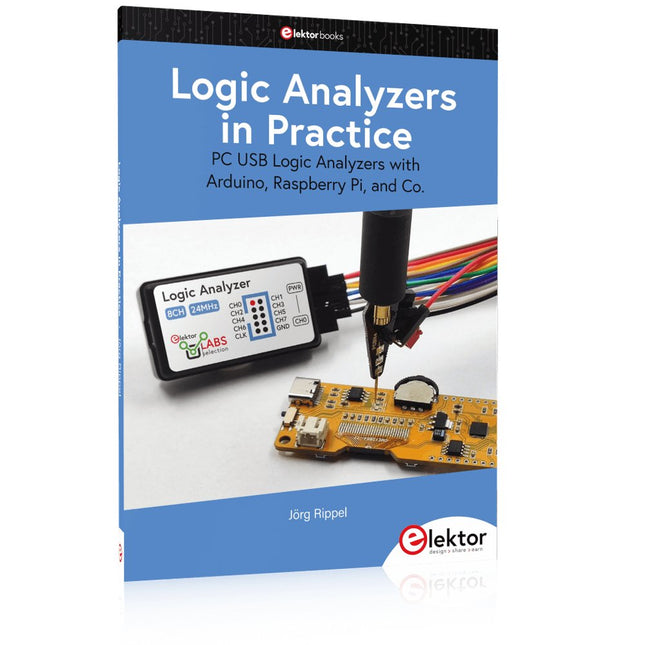
Elektor Publishing Logic Analyzers in Practice
PC USB Logic Analyzers with Arduino, Raspberry Pi, and Co. Step-by-step instructions guide you through the analysis of modern protocols such as I²C, SPI, UART, RS-232, NeoPixel, WS28xx, HD44780 and 1-Wire. With the help of numerous experimental circuits based on the Raspberry Pi Pico, Arduino Uno and the Bus Pirate, you will learn the practical application of popular USB logic analyzers. All the experimental circuits presented in this book have been fully tested and are fully functional. The necessary program listings are included – no special programming or electronics knowledge is required for these circuits. The programming languages used are MicroPython and C along with the development environments Thonny and Arduino IDE. This book uses several models of flexible and widely available USB logic analyzers and shows the strengths and weaknesses of each price range. You will learn about the criteria that matter for your work and be able to find the right device for you. Whether Arduino, Raspberry Pi or Raspberry Pi Pico, the example circuits shown allow you to get started quickly with protocol analysis and can also serve as a basis for your own experiments. After reading this book, you will be familiar with all the important terms and contexts, conduct your own experiments, analyze protocols independently, culminating in a comprehensive knowledge set of digital signals and protocols.
€ 34,95
Membres : € 31,46
-

Elektor Digital MIT App Inventor Projects (E-book)
50+ Android Apps with Raspberry Pi, ESP32 and Arduino This book is about developing apps for Android compatible mobile devices using the MIT App Inventor online development environment. MIT App Inventor projects can be in either standalone mode or use an external processor. In standalone mode, the developed application runs only on the mobile device (e.g. Android). In external processor-based applications, the mobile device communicates with an external microcontroller-based processor, such as Raspberry Pi, Arduino, ESP8266, ESP32, etc. In this book, many tested and fully working projects are given both in standalone mode and using an external processor. Full design steps, block programs, circuit diagrams, QR codes and full program listings are given for all projects. The projects developed in this book include: Using the text-to-speech component Intonating a received SMS message Sending SMS messages Making telephone calls using a contacts list Using the GPS and Pin-pointing our location on a map Speech recognition and speech translation to another language Controlling multiple relays by speech commands Projects for the Raspberry Pi, ESP32 and Arduino using Bluetooth and Wi-Fi MIT APP Inventor and Node-RED projects for the Raspberry Pi The book is unique in that it is currently the only book that teaches how to develop projects using Wi-Fi and Node-RED with MIT App Inventor. The book is aimed at students, hobbyists, and anyone interested in developing apps for mobile devices. All projects presented in this book have been developed using the MIT App Inventor visual programming language. There is no need to write any text-based programs. All projects are compatible with Android-based mobile devices. Full program listings for all projects as well as detailed program descriptions are given in the book. Users should be able to use the projects as they are presented, modifying them to suit their own needs.
€ 32,95
Membres : € 29,66
-

Elektor Publishing Das offizielle Raspberry Pi Handbuch
Von den Machern von MagPi, dem offiziellen Raspberry Pi Magazin Starten Sie jetzt mit dem Raspberry Pi 5, dem neuesten und besten Minicomputer von Raspberry Pi – und lernen Sie, mit diesem unglaublichen Computer zu programmieren und Projekte zu erstellen. In diesem Buch finden Sie außerdem jede Menge kreative Ideen und Tipps, die Sie mit dem Raspberry Pi 4, dem Raspberry Pi Zero 2 W und dem Raspberry Pi Pico W umsetzen können. Mit den neuesten Reviews, Tutorials, Projekten, Anleitungen und mehr ist dies Ihre ultimative Ressource für den Raspberry Pi! 228 Seiten über Raspberry Pi Alles, was Sie über den Raspberry Pi 5 wissen müssen Erste Schritte für jeden Raspberry Pi Viel Spaß mit Elektronik und dem Pico W Inspirierende Projekte für Ihre nächste Bauidee Lernen Sie MicroPython, indem Sie ein Handheld bauen Erste Schritte mit dem Raspberry Pi Camera Modul Künstliche Intelligenz: Bauen Sie Ihren eigenen GPT Chatbot
€ 34,80
Meilleur prix
-

Elektor Digital Elektor March/April 2022 (PDF)
Build Your Own RISC-V ControllerFirst Steps with the NEORV32 RISC-V Softcore for Low-Cost FPGAs How to Use Arduino’s Serial PlotterPlotting Graphs With Arduino Is Easy CLUE from AdafruitA Smart Solution for IoT Projects Buffer Board for the Raspberry Pi 400Protect the I/Os Raspberry Pi RP2040 Boards Aplenty A Handbook on DIY Electronic Security and EspionageSRAM Heated or Deep-Frozen Component IdentificationTips & Tricks, Best Practices and Other Useful Information DIY Touchless Light Switch Starting out in ElectronicsMatching and Transforming What’s New in Embedded Development?Rust and Keeping IoT Deployments Updated Infographics How the Industrial and Automotive Sectors Will Benefit from 5G Moving Coil RelaysPeculiar Parts, the series HomeLab ToursEverything Revolves Around the Tools... Understanding the Neurons in Neural Networks (Part 4)Embedded Neurons Magnetic Levitation the Very Easy WayThe Third and Most Compact Version PLC Programming with the Raspberry Pi and the OpenPLC ProjectVisualization of PLC Programs with AdvancedHMI From Life's ExperiencePack Up and Leave Under Your RadarMicrocontrollers You Should Know About Monitor and Debug Over the AirA Solution for Arduino, ESP32 and Co. Portable Temperature- and Humidity-Measuring DeviceUsing Ready-Made Modules Lithium Battery Pack RepairSave Money + More Power! GUIs with PythonMeme-Generator Three Questions to Build OnWhy, What, and Who? HexadokuThe Original Elektorized Sudoku
€ 7,50
-
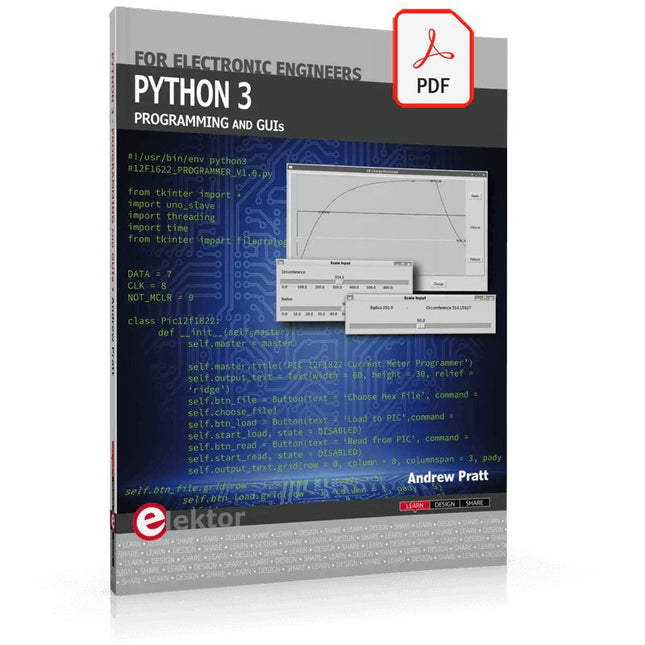
Elektor Digital Python 3 Programming and GUIs (E-book)
This is the second edition of a book aimed at engineers, scientists, and hobbyists who want to interface PCs with hardware projects using graphical user interfaces. Desktop and web-based applications are covered. The programming language used is Python 3, which is one of the most popular languages around: speed of programming being a key feature. The book has been revised and updated with an emphasis on getting the user to produce practical designs with ease – a text editor is all that is required to produce Python programs. Hardware interfacing is achieved using an Arduino Uno as a remote slave. A full description and source code of the communication interface is given in the book. The slave provides digital and analog input and outputs. Multiple Unos can be included in one project with all control code written in Python and running on a PC One project involves a PIC microcontroller with the code provided that can be loaded into the PIC using the Uno. The web applications and server are all implemented in Python, allowing you to access your electronic hardware over the Internet. The Raspberry Pi computer can be used as your web server. An introductory chapter is provided to get you started with using Linux. The book is written for use with Debian or variations including Mint or Ubuntu. All of the programs in the book are freely available, ready to use and experiment with by way of a download from Elektor.
€ 29,95
Membres : € 26,96
-

Elektor Digital Sensoren aan de Raspberry Pi (E-book)
Het boek “Sensoren aan de Raspberry Pi” richt zich tot iedereen die zich wil verdiepen in een Raspberry Pi in combinatie met Windows 10 IoT Core. Dit besturingssysteem biedt samen met een RPi weliswaar veel rekenkracht, maar voor de communicatie met de buitenwereld zijn nog externe modules en sensoren nodig. Daartoe wordt in dit boek gebruik gemaakt van een sensor-kit met 35 modules die nog geen 60 euro kost. Auteur Florian Schäffer begint zijn boek met de introductie van de Raspberry Pi en hij beschrijft welke hardware u nodig hebt om met de RPi te kunnen werken. Dan volgt een eerste kennismaking met Windows 10 IoT Core. Daarna wordt dieper ingegaan op het gebruik van Visual Studio 2015 en worden de eerste programmeervoorbeelden beschreven. Ook wordt uitgelegd hoe een MySQL-databank kan worden aangestuurd via een app en hoe de als webserver kan worden ingezet. In het tweede deel worden de sensoren stuk voor stuk beschreven met hun eigenschappen en worden er veel toepassingsvoorbeelden gegeven. De source-codes van de programma’s zijn als download bij het boek beschikbaar. Tot slot wordt nog aandacht besteed aan het gebruik van druktoetsen en schakelaars, en het werken met digitale uitgangen en analoge ingangen.
€ 24,95
Membres : € 22,46
-

Elektor Digital Elektor March/April 2020 (PDF) EN
The Elektor LoRa NodeVersatile, long-range, 868-MHz remote control with state feedback and STM32 Inside InteractiveCorrections & Updates || Questions & Answers Analogue Electronics DesignCase Study #1 — Section 2: Preamplifier optimized for MEMS microphone My IoT Button: A Button for the WebPart 1: IoT architecture BASIC for the ESP32 and ESP8266Programming with Annex WiFi RDS ESP32 Doorbell via Telegram“The UPS Man Always Rings Once” Small Circuits RevivalCapita Selecta from the Elektor Project Suggestions Box My First LoRaWANWith Blue Pill, LoRa Breakout Board and The Things Network Elektor Connexions 2003EL “A Strong Supporter of Open Internet”Interview with Wienke Giezeman, Initiator of The Things Network The Meadow F7 BoardA great board for .NET developers Practical ESP32 Multitasking (2)Task priorities Sigfox and the IoT (3)First steps on the network Raspberry Pi Bash Command Cheat Sheet Europe's Most Successful Start-up Accelerator?HighTechXL, Eindhoven, The Netherlands Review: The Enviro+ RPi-HATMeasure air quality with a Raspberry Pi and the Enviro+ HAT Steeped in Electronicsordering components from Ukraine and Russia Review: Andonstar AD407Better than its predecessor? Lab, Sweet LabA glimpse of The Holy Place — no unauthorized entry. Optical Probe for OscilloscopesMeasure brightness fluctuations of lighting systems The 'TABULA' Project - An UpdateTangibles with user feedback How-To Calculate the Prospective Short-Circuit Current or PSCCand choose the proper circuit breaker TMS1000 Series Microcontrollers Peculiar Parts, the series Starting Out in Electronics (2) Easier than imagined! Developer's ZoneTips & Tricks, Best Practices and Other Useful Information Locating Wayward Wires Track and trace concealed and defective cables with ease and certainty Review: Joy-IT DMSO2D72 Portable 3-in-1 Oscilloscope Homebrew PC for the Electronics LabTips on Component Choice and Construction The Elektor ‘Intelekt’ Chess Computer (1981)Tiny Chess 86 ported to the Intel 8088 Beyond ElectronicsPCB Art - Pushing the Limits of Industrial Manufacturing
€ 7,50


